What Is IFTA?
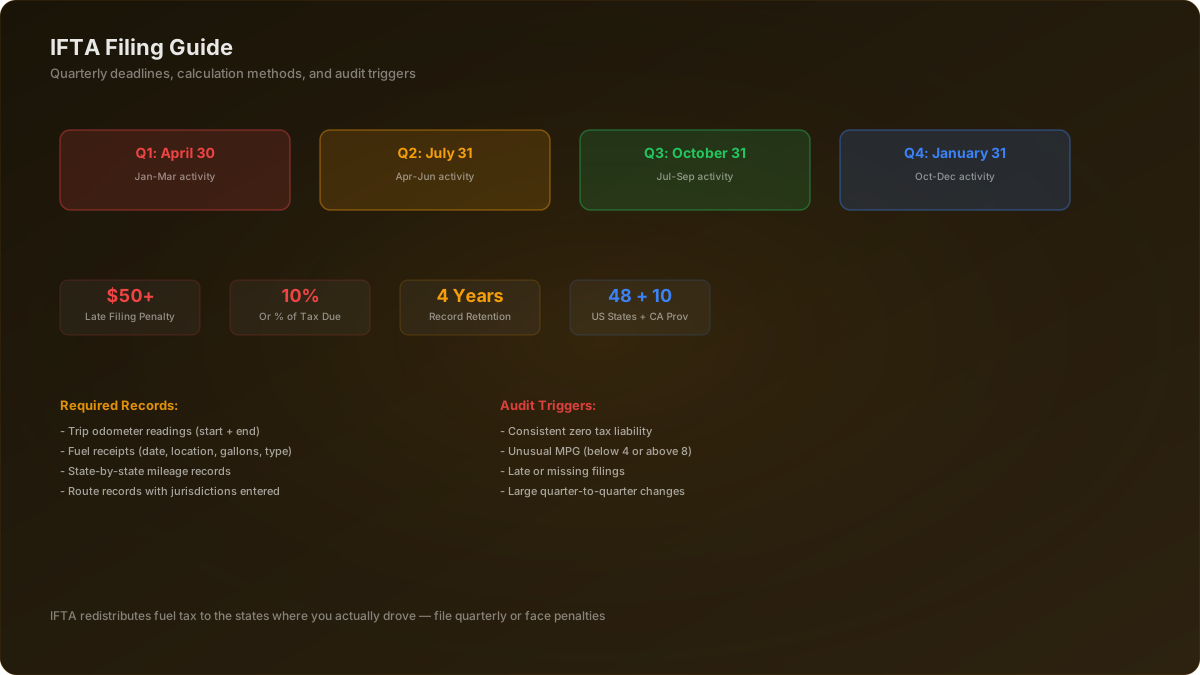
IFTA (International Fuel Tax Agreement) is an agreement between 48 US states and 10 Canadian provinces that simplifies fuel tax reporting for interstate carriers. Instead of filing separate fuel tax returns with each state you drive through, IFTA lets you file one quarterly return through your base (home) jurisdiction, which then distributes taxes to the other states.
You need an IFTA license if you operate a qualified motor vehicle — any vehicle used, designed, or maintained for transportation of persons or property and that has two axles and a gross vehicle weight or registered gross vehicle weight exceeding 26,000 pounds, or has three or more axles regardless of weight, or is used in combination when the combined weight exceeds 26,000 pounds.
Quarterly Filing Deadlines
Q1
Jan - Mar
Due: April 30
Q2
Apr - Jun
Due: July 31
Q3
Jul - Sep
Due: October 31
Q4
Oct - Dec
Due: January 31
Late returns incur a $50 minimum penalty or 10% of net tax due (whichever is greater), plus monthly interest on unpaid balances.
Step-by-Step: Filing Your IFTA Return
Gather Your Records
Collect all fuel receipts and trip records for the quarter. You need: fuel purchase receipts (date, location, gallons, amount), odometer readings at the start and end of each trip, and mileage by state/province for each trip.
Calculate Miles Per State
Total your miles driven in each IFTA jurisdiction. Use GPS records, ELD data, or trip sheets. Be accurate — discrepancies between reported mileage and what your truck's systems show are a top audit trigger.
Calculate Total Fuel Purchased Per State
Total gallons of fuel purchased in each state. Your fuel receipts must show the state of purchase. Credit card statements alone are not sufficient — you need actual receipts.
Determine Your Fleet MPG
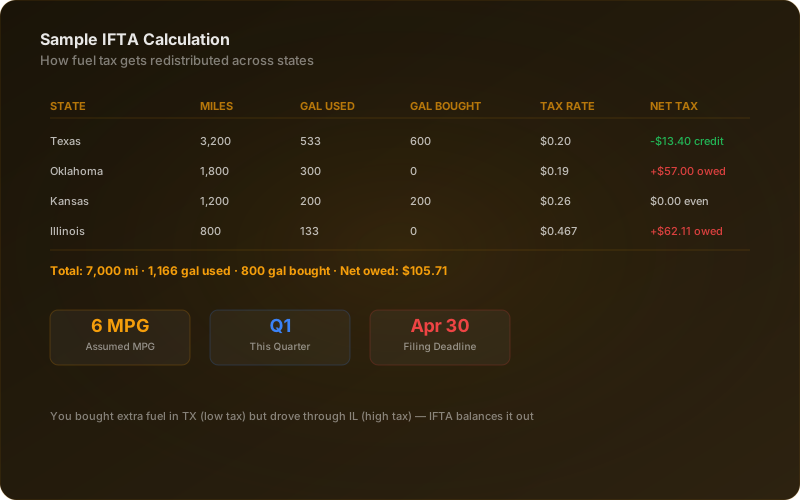
Divide total miles driven by total gallons consumed: Total Miles ÷ Total Gallons = Fleet MPG. This is your overall fleet fuel efficiency for the quarter. Most loaded semis average 5.5-7.0 MPG.
Calculate Taxable Gallons Per State
For each state: Miles in State ÷ Fleet MPG = Taxable Gallons. This represents the fuel you theoretically consumed in that state based on your fleet efficiency.
Calculate Net Tax Per State
(Taxable Gallons - Purchased Gallons) × State Tax Rate = Net Tax. If positive, you owe that state. If negative, you get a credit (you bought more fuel there than you consumed).
File Through Your Base Jurisdiction
Submit your return through your home state's IFTA portal. Most states have online filing systems. Pay any net tax owed. Credits from one state offset taxes owed to another.
Try our free tool: Use our IFTA Tax Calculator to estimate your quarterly tax before filing. Enter miles and gallons per state to see what you'll owe or be credited.
Common Mistakes That Trigger Audits
IFTA audits examine 4 years of records. These mistakes put you on the radar:
Unrealistic MPG
Reporting 9+ MPG for a loaded semi is a red flag. Auditors know realistic ranges by equipment type.
Missing Fuel Receipts
You need receipts for every fuel purchase. No receipt = no credit for that purchase during an audit.
Estimated Mileage
Using round numbers or estimates instead of actual mileage data signals inaccuracy to auditors.
Consistent Zero Liability
Filing returns showing $0 owed quarter after quarter is unusual and draws attention.
Record-Keeping Best Practices
- Keep all fuel receipts for 4 years minimum — that's the IFTA audit lookback period
- Use a fuel card that provides detailed reporting by state and date
- Record odometer readings at every state line crossing
- Use your ELD data to verify state-by-state mileage
- Scan or photograph paper receipts as backup — paper fades
- Reconcile your records monthly, not just at quarter end
Many trucking accounting software programs (like Motive and ATBS) can automate much of the IFTA tracking process using ELD integration and fuel card data.
Related Resources
- FMCSA IFTA Information — Official IFTA registration and compliance details
- Fuel Cost Calculator — Estimate fuel expenses for any route
- IFTA Tax Calculator — Calculate your quarterly fuel tax obligation
- New Authority Checklist — Complete setup guide including IFTA licensing
Truck Dispatch Experts
Published May 20, 2025 · Updated Jan 10, 2026